Use Ketcher as JS Library Without UI
How to Ketcher as a JavaScript library without the editor UI?
✍: FYIcenter.com
 Since Ketcher offers so many API functions, we can just use it as
a JavaScript library without its editor UI.
Since Ketcher offers so many API functions, we can just use it as
a JavaScript library without its editor UI.
Here is an HTML document that shows you how to hide the Ketcher editor UI and use it as JavaScript library:
<html>
<!-- ketcher-as-hidden-element.html Copyright (c) FYIcenter.com. -->
<head>
<title>Use Ketcher as a Hidden Element</title>
</head>
<body>
<iframe id=frmKetcher src="/ketcher/index.html"
style="display: none;"></iframe>
<p>Enter a SMILES string, then click convert button:</p>
<p><input id=input size=60 /></p>
<p><button onclick="convert();">Convert</button></p>
<pre id=output style="background-color: #ddd;"></pre>
<script>
var ketcher = null;
function sleep(ms) {
return new Promise(resolve => setTimeout(resolve, ms));
}
async function convert() {
frm = document.getElementById("frmKetcher");
ketcher = frm.contentWindow.ketcher;
ketcher.setMolecule(document.getElementById("input").value);
await sleep(1000);
structure = "";
ketcher.getSmiles()
.then(consumeSmiles, consumeSmiles)
.then(consumeSmarts, consumeSmarts)
.then(consumeMolfile, consumeMolfile)
.then(consumeRxn, consumeRxn)
.then(consumeCDXml, consumeCDXml)
.then(consumeKet, consumeKet)
.finally(consumeEnd);
}
function consumeSmiles(result) {
structure += "\nSMILES:\n";
structure += result.toString()+"\n";
return ketcher.getSmarts();
}
function consumeSmarts(result) {
structure += "\nSMARTS:\n";
structure += result.toString()+"\n";
return ketcher.getMolfile();
}
function consumeMolfile(result) {
structure += "\nMolfile:\n";
structure += result.toString()+"\n";
return ketcher.getRxn();
}
function consumeRxn(result) {
structure += "\nRXN:\n";
structure += result.toString()+"\n";
return ketcher.getCDXml();
}
function consumeCDXml(result) {
structure += "\nCDXml\n";
structure += result.toString()+"\n";
return ketcher.getKet();
}
function consumeKet(result) {
structure += "\nKetcher:\n";
structure += result.toString()+"\n";
}
function consumeEnd(result) {
document.getElementById("output").innerText
= structure.replace(/&/g, '&').replace(/</g, '<');
}
</script>
</body>
</html>
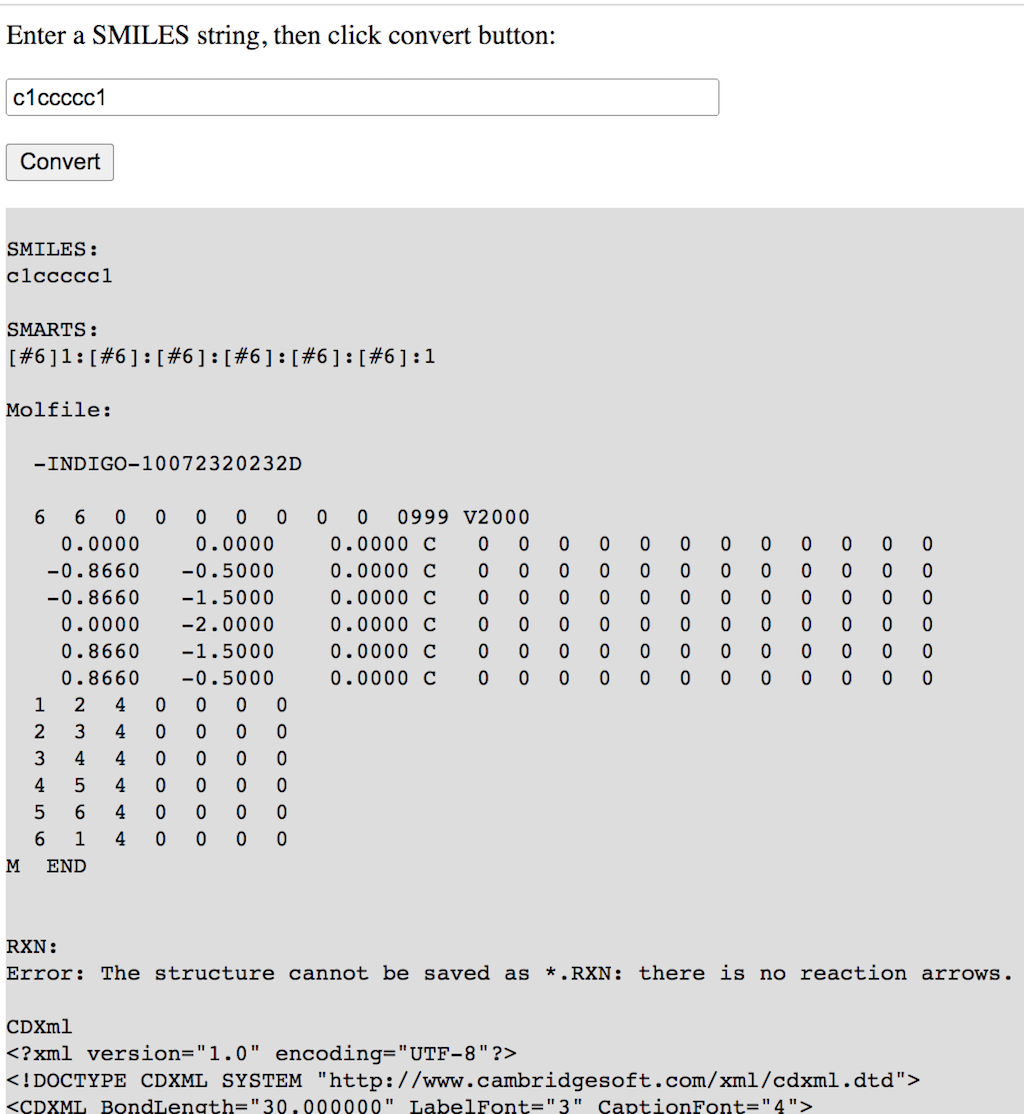
Open the above HTML document on your local Web server. And enter the SMILES string of a chemical structure.
Click "Convert" button, you will see that the SMILES string gets converted into SMARTS, Molfile, and other chemical structure file formats.
2023-10-27, 1754🔥, 0💬
Related Topics:
 Molecule FYI-1004866
Molecule Summary: ID: FYI-1004866 Names: InChIKey: PSANZGLIJSQVBZ-UHFFFAOYSA-N SMILES: Cc3cccc(/N=C\\2Cc1ccccc1N2)c3C Received at FYIcenter.com on: 2023-09-25 2023-10-15, 3158🔥, 0💬
Molecule FYI-1004864
Molecule Summary: ID: FYI-1004864 Names: InChIKey: KQAVUGAZLAPNJY-UHFFFAOYSA-N SMILES: O=C1CC=CC1 Received at FYIcenter.com on: 2023-09-25 2023-10-15, 2729🔥, 0💬
Molecule FYI-1004865
Molecule Summary: ID: FYI-1004865 Names: InChIKey: HBRPWLBFSFKBJN-UHFFFAOYSA-N SMILES: CC1=C(C(C)C)CCC1 Received at FYIcenter.com on: 2023-09-25 2023-10-15, 2527🔥, 0💬
Molecule FYI-1004867
Molecule Summary: ID: FYI-1004867 Names: HEXANE; InChIKey: VLKZOEOYAKHREP-UHFFFAOYSA-N SMILES: CCCCCC Received at FYIcenter.com on: 2023-09-25 2023-10-15, 2482🔥, 0💬
