Install PyMol Incentive Edition on MacOS
How to download and install PyMol Incentive edition on macOS?
✍: FYIcenter.com
 Downloading and installing PyMol Incentive edition on macOS is straightforward and easy
as shwon in the following steps:
Downloading and installing PyMol Incentive edition on macOS is straightforward and easy
as shwon in the following steps:
1. Go to PyMol Website at pymol.org.
2. Download and save the macOS DMG Disk Image file: PyMOL-2.3.3_107-MacOS-py37.dmg.
3. Double-click on PyMOL-2.3.3_107-MacOS-py37.dmg to install it with default settings. Once installed, PyMol will be available as an "application" on you macOS and accessible from the Launchpad.
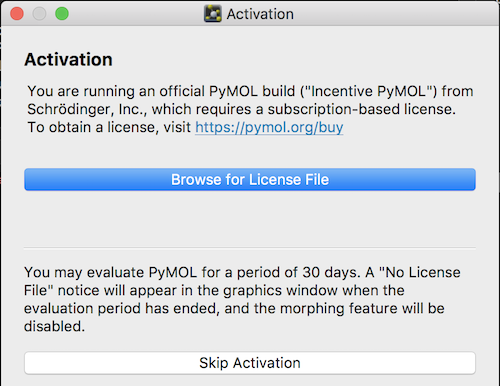
4. Click "PyMol" on the Launchpad to start PyMol. You see the "Activation" screen.
5. Click "Skip Activation" button. You should be able to run the incentive edition for 30 days without purchasing the subscription license.
Â
⇒ Install PyMol Open Source Edition on macOS
⇠What Is PyMol
⇑⇑ PyMol Tutorials
2020-04-16, 2364🔥, 0💬
Related Topics:


