$3Dmol.download('cid:...', ...) - Download CID Molecule
How to download molecule by CID with the $3Dmol.download() method?
✍: FYIcenter.com
 The syntax to download molecule by CID with the $3Dmol.download() method
is shown below:
The syntax to download molecule by CID with the $3Dmol.download() method
is shown below:
$3Dmol.download("cid:{CID}", viewer, options, callback) -> {$3Dmol.GLModel}
  viewer - The $3Dmol.GLViewer instance where the downloaded protein is added
  options - Options applied to the downloaded data
  callback - Function to call after data is loaded with model as argument
Here is an HTML code example, Download-PDB.html, that uses the download() method to download a protein with a given CID number.
<html><head>
<script src="/3Dmol-min.js"></script>
</head>
<body>
<div id="viewer" style="width: 400px; height: 400px; position: relative;"></div>
<script>
  let config = { backgroundColor: 'grey' };
  let viewer = $3Dmol.createViewer( $('#viewer'), config );
  $3Dmol.download('cid:2719', viewer, {}, function(m) {
    m.setStyle({'stick':{}});
    viewer.render();
  });
</script>
</body></html>
This example HTML code will display the 3-D molecule structure of Chloroquine in stick style:
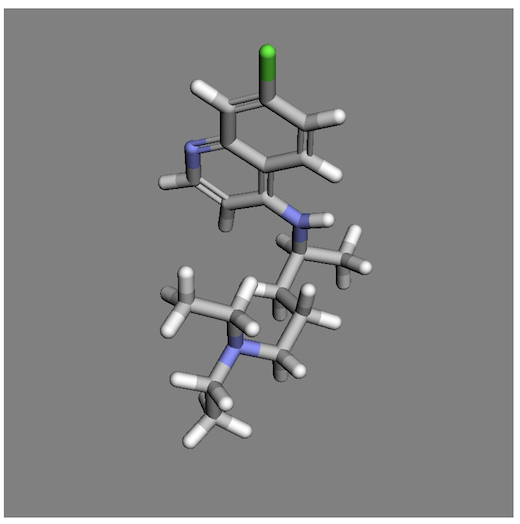
Note that the molecule structure data is downloaded with the following PubMed API:
https://pubchem.ncbi.nlm.nih.gov/rest/pug/compound/cid/{CID}/SDF?record_type=3d
⇒ GLViewer Class and Instance Methods
⇐ $3Dmol.download('pdb:...', ...) - Download PDB Protein
⇑⇑ 3Dmol.js FAQ
2023-01-11, 1814🔥, 0💬
Related Topics:
 Molecule FYI-1001936
Molecule Summary: ID: FYI-1001936 SMILES: C1=CC(=CC=C1C2=C(C(=O)C3=C(O2) C=C(C=C3)O)O)OReceived at FYIcenter.com on: 2023-01-02 2023-01-08, 3111🔥, 0💬
Molecule FYI-1001935
Molecule Summary: ID: FYI-1001935 SMILES: OC[C@H]1O[C@H]([C@@H]([C@H]([C @@H]1O)O)O)c1c(O)cccc1OReceived at FYIcenter.com on: 2023-01-02 2023-01-08, 3098🔥, 0💬
Molecule FYI-1001937
Molecule Summary: ID: FYI-1001937 SMILES: C[C@H]1OC(Oc2cc3OC(=Cc4ccc(c(c 4)O)O)C(=O)c3c(c2)O)[C@@H]([C@ H]([C@H]1C)C)CReceived at FYIcenter.com on: 2023-01-02 2023-01-08, 2996🔥, 0💬
